Pool Chemical Calculator
- 3.5
- Rating
- 50.00K
- Installs
- Free
- Price
 Analysis by App-foxy
Keeping pool water balanced sounds simple until the test results start moving in different directions. One reading suggests adding sanitizer, another points toward pH correction, and the amount needed depends on the pool itself rather than a universal spoonful. I reviewed Pool Chemical Calculator as a practical tool for that moment: you enter the information you have, use the calculation to plan a treatment, and then return to testing instead of relying on guesswork.
That focus makes it quite different from a general home-maintenance app. It is a House & Home app from Gunter Business Solutions, aimed at people who want help with pool chemistry rather than a broad collection of cleaning reminders or seasonal checklists. The app is free to install, carries an Everyone age rating, and has reached over 50 thousand installs. Its average rating is 3.5 from around 200 ratings, which feels consistent with my impression: useful for a specific job, but not so polished or comprehensive that every pool owner will find it indispensable.
What I looked for before trusting the calculations
The first question I would ask before choosing any pool calculator is not whether it has a long feature list. I want to know whether it helps me make a safer, more repeatable decision from the test results I already have. A good tool should reduce mental arithmetic, make the target adjustment understandable, and avoid encouraging me to pour several products into the water without checking what happened after the first treatment.
You May Also Like

 Blood Strike: 2.5 Anniversary
Blood Strike’s Loadouts Turn Every Drop Into a Tactical Gamble
A close look at Blood Strike’s custom loadouts: how fast access to signature weapons reshapes its battle royale rhythm, rewards preparation, and narrows the gap between fights.

 Pandora - Music & Podcasts
Pandora’s Music Is Easy to Start, but Harder to Recover
Pandora’s strength is its low-effort path from a seed to a station. Its weak spot is how much confidence it asks you to place in connection, setup, and quiet recovery.

 8 Ball Pool
 Is Built on Rivalries, Rematches, and Routine
A close look at the rivalries, rematches, shared routines, and unanswered safety questions that turn a quick pool match into a persistent mobile community.

 Samsung Music
’s Quiet Strength Is Playing What You Already Own
Its reach comes less from spectacle than from dependable access to a personal library. That simplicity is both the app’s strongest retention engine and its ceiling.

 AccuWeather: Weather Radar
AccuWeather Review: A Quick, Clear Forecast for Everyday Decisions
For everyday plans, the best forecast is the one you can understand quickly. AccuWeather makes rain timing, radar, and local conditions easy to act on, with a few trade-offs.

 Hill Climb Racing
Why Hill Climb Racing Still Turns Crashes Into One More Run
A tiny car, a bumpy hill and one more upgrade: Hill Climb Racing keeps resurfacing because its simple chaos makes every near-miss feel personal.
More From Our News Desk
View All News


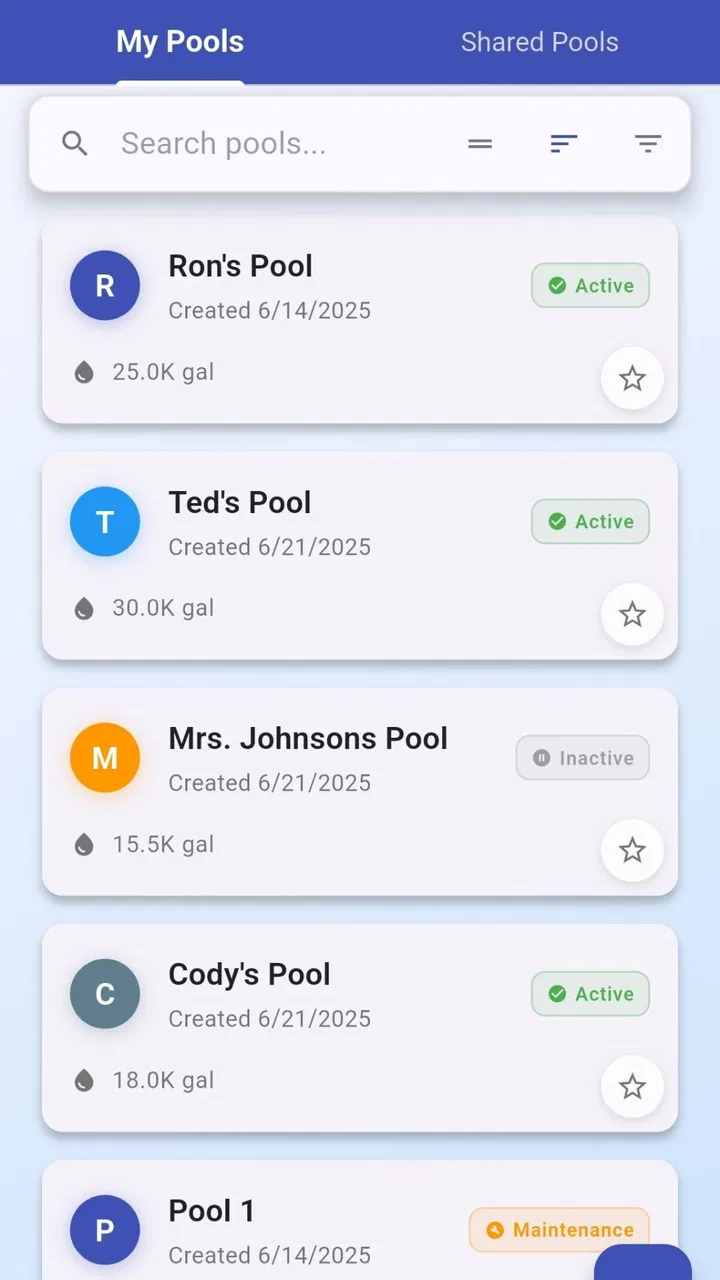
That is where this app makes sense. Its store summary is to track and balance pool chemical levels, and the short description calls it a Pool Chemical Calculator. In practical terms, I see it as a calculation companion rather than a complete pool-management system. It can support the decision about what to adjust, but it does not replace a reliable test kit, careful product labels, or basic knowledge about when chemicals should never be mixed.
I also paid attention to how much information a user needs to prepare. A calculator is only convenient if I can gather the pool volume and current readings without turning a quick maintenance task into a research project. Before opening the app, I would keep the latest test results nearby, confirm the pool size, and check the strength or concentration printed on the chemical container. That last step matters because two products with similar names may not have identical strengths.
My most useful habit with this kind of tool is to treat the result as a starting dose, not an instruction to empty several containers at once. Pool water changes gradually, and test strips can be imprecise. I would make one correction, allow the water to circulate according to my normal maintenance routine, and test again before making another substantial adjustment. The calculator is most valuable when it creates a careful process, not when it encourages blind precision.
The everyday situation where it earns its place
Imagine checking the pool before a weekend swim and finding that the pH is outside the range you normally aim for. I would first record the reading, confirm the water volume, and open the app instead of trying to estimate a dose from memory. After entering the relevant values, I could use the result to plan a measured correction, write down what I added, and keep the next test comparable.
That workflow is especially helpful after a refill, heavy rain, or a period when the pool has been used more than usual. Those events can make a familiar routine less reliable. I would not expect the app to diagnose every cause of a changing reading, but it can help me avoid the common mistake of treating the pool with a random amount simply because the water looks cloudy or feels different.
Another less obvious use is record consistency. Even if I prefer to keep a paper notebook, the calculator gives me a fixed place to perform the arithmetic each time. That makes it easier to compare what I intended to add with what I actually added. For a household where more than one person handles pool care, this can reduce the “I thought you already treated it” problem, provided everyone follows the same testing and note-taking routine.
Where the focused design works well
The strongest part of Pool Chemical Calculator is its narrow purpose. I do not have to search through articles or convert units manually every time I want to estimate a treatment. The app is built around the kind of question pool owners ask repeatedly: given the current condition and the pool’s size, what adjustment should I consider?
That focus also makes it more approachable for someone who understands basic pool care but dislikes chemistry calculations. A new pool owner can use it as a learning aid, because the numbers connect a test result with a practical action. I would still read the chemical manufacturer’s instructions, but seeing the calculation in context is easier than memorizing formulas or copying a recommendation from a forum that may describe a different pool.
It is also a reasonable fit for owners who maintain one pool and want a lightweight helper. If I already know my pool volume and usually buy the same products, the app can become part of a short routine: test, calculate, treat cautiously, circulate, and test again. That is less cumbersome than opening a full maintenance platform when I only need help with one adjustment.
The current version is 5.6.8, and the app supports Android 7.0 or later. That broad device compatibility is useful if I keep an older phone in the garage or use a budget handset for outdoor chores. I would not choose an app solely because it runs on an older operating system, but in this case it supports the practical nature of the tool: pool care does not require my newest phone.
Small details that affect real-world accuracy
The calculation can only be as good as the information I enter. Pool volume is often estimated, especially with irregular shapes, sloped floors, or connected sections. If I use an inflated volume, the suggested amount may be too high; if I underestimate it, the correction may be too weak. I would measure the pool as carefully as possible and keep the method consistent rather than changing the assumed volume from one visit to the next.
Test timing is another trade-off. A reading taken immediately after adding a product may not represent the whole pool, while a reading taken after unusual weather may reflect a temporary change. I would use the app after taking a normal, properly collected sample, not as a substitute for sampling technique. This is one of the reasons I would resist treating its output as an exact promise.
Product identity matters too. A chemical calculator may help with the amount needed for a particular adjustment, but I still need to select the correct product and understand its concentration. I would compare the app’s recommendation with the container directions before adding anything. If the two disagree, I would pause and investigate rather than automatically choosing the larger amount.
These are not flaws unique to this app, but they define how I would use it. The tool can remove arithmetic from the process; it cannot remove the responsibility to test properly, identify the product, or account for unusual pool conditions. That distinction is important for anyone hoping for a one-tap answer.
How it compares with the usual alternatives
The most common alternative is doing the math manually from the chemical label. That costs nothing beyond time, and it may be perfectly adequate for an experienced owner who has a stable routine. I still prefer the app when several values are involved, because manual calculations are easy to rush when I am standing outside with wet hands and a test strip.
Another alternative is a general pool-maintenance app. Those products may appeal more to someone who wants reminders, logs, service planning, equipment notes, or a broader history of the pool. I would choose that category if my main problem were remembering tasks across a season. Pool Chemical Calculator is more attractive when the immediate problem is dosage math and I do not want a full dashboard.
Some owners rely on advice from a local pool shop or online community. Human guidance can be better when the water has a stubborn problem, the pool uses unusual equipment, or several readings are changing together. The downside is that advice may take time and may not match my exact pool or product. I see this app as a useful first step for routine adjustments, not a replacement for expert help when the chemistry remains unstable.
There is also the option of a digital testing system that automatically records readings. That can be more convenient for someone who wants ongoing monitoring and is willing to pay for a larger setup. I would not switch to such a category merely to solve occasional arithmetic. For a hands-on owner who already tests manually, this app is the lower-friction choice. For someone seeking automation, trend analysis, or a complete maintenance record, a more specialized system may fit better.
The friction of moving from a familiar routine
Switching to a calculator is not difficult, but it does require changing how I prepare for maintenance. I need to know the pool volume, keep current test results, and identify the product I plan to use. If I normally estimate doses by memory, the first few sessions may feel slower because I am checking more inputs instead of acting immediately.
That extra care is worthwhile for a new pool owner, but it may feel unnecessary to someone who has used the same chemicals in the same pool for years. In that case, the app’s value depends on how often conditions vary. After a refill, a significant weather event, or a change of product, I would welcome the calculation. During a stable period, an experienced owner might find a label and a familiar measuring routine faster.
Cost is also worth viewing realistically. The app is free to install, but it includes in-app purchases ranging from $0.99 to $99.99 per item. That wide range means I would check what is included before paying for anything. The free entry point makes it easy to try the core workflow, while the possible purchase range means I would not assume every useful function is included without charge.
I would also avoid paying simply because I wanted reassurance. A purchase cannot make an inaccurate test result accurate, and it cannot compensate for an incorrectly estimated pool volume. I would first use the basic experience with my normal maintenance routine. If it genuinely saves time over several treatments, then I could decide whether an optional purchase is justified for my needs.
Who should use it, and who should skip it
I would recommend Pool Chemical Calculator to a homeowner who tests their own pool, wants help with chemical calculations, and prefers a focused tool over a broad maintenance platform. It is particularly suitable for someone who is comfortable entering measurements but does not want to repeatedly work through formulas on paper.
It is also useful for occasional owners who take responsibility for pool care during holidays or busy periods. When I have not performed a treatment recently, a structured calculation can be safer than guessing. The app can give a family member or house sitter a more consistent starting point, although I would still leave clear written instructions about testing, product handling, and when not to add anything.
I would skip it if I expect automatic testing, professional diagnosis, or a complete maintenance calendar. It is not the right category for someone who wants the phone to monitor the water without manual readings. I would also be cautious if I rarely maintain the pool myself and would rather have a technician handle chemical decisions. In that situation, learning the app may add a step without solving the real problem.
People with complicated water issues should treat it as a secondary aid at most. Persistent cloudiness, recurring algae, unusual stains, or readings that swing sharply can involve filtration, circulation, contamination, or equipment problems. A dosage calculation alone may not address those causes. I would seek advice from a qualified pool professional rather than repeatedly increasing chemical additions.
My recommendation after using it as a decision tool
Pool Chemical Calculator is a sensible, focused helper for routine pool chemistry. I like that it addresses a real maintenance task without pretending to be an entire household management system. Its best quality is not flashy presentation; it is the way it can make a repeatable calculation part of a cautious test-and-adjust routine.
My recommendation comes with a clear condition: use it alongside testing and product instructions, not instead of them. Enter careful measurements, make one controlled adjustment, allow the water to mix, and check the result again. That approach turns the app from a number generator into a useful maintenance habit.
The 3.5 average from around 200 ratings suggests that the experience will not satisfy everyone, and I understand why. Owners wanting automation, extensive records, or professional-level guidance may outgrow it quickly. The in-app purchase range also deserves attention before committing money beyond the free installation.
For my own decision, I would install it if I maintained a residential pool manually and wanted a dedicated calculator on an Android device running version 7.0 or newer. I would not install it expecting a diagnosis engine or a replacement for a pool professional. Used within those boundaries, this is a practical free starting point for turning pool test results into more deliberate chemical decisions, especially when guessing would be the less comfortable alternative.
FAQs for Pool Chemical Calculator
01What is Pool Chemical Calculator used for?
Pool Chemical Calculator is designed to help pool owners estimate the amount of chemicals needed to adjust and maintain water balance. It can typically calculate recommendations for products such as chlorine, pH increaser or reducer, alkalinity increaser, and stabilizer. The app is useful for routine maintenance, although its results should be treated as guidance rather than a substitute for accurate water testing or professional advice.
02How accurate are the chemical recommendations in Pool Chemical Calculator?
The calculations can be helpful when the information entered is correct, but the results depend entirely on accurate measurements and product specifications. You normally need to provide details such as pool volume, current readings, desired levels, and chemical strength. Test your water with a reliable kit before using the app, and always compare its recommendation with the instructions printed on the chemical container.
03What information do I need to enter before using the app?
To get useful results, you should know your pool’s approximate volume and have recent readings for parameters such as pH, free chlorine, total alkalinity, calcium hardness, or stabilizer, depending on the calculation you want to perform. Some products have different concentrations, so checking the label and selecting the correct units is important. Incorrect pool dimensions or measurements can produce unsuitable dosing advice.
04Can Pool Chemical Calculator be used for both saltwater and chlorine pools?
The app may be useful for many pool types, but the available calculations and supported chemical products can vary. Saltwater pools still use chlorine generated by a salt system, while their maintenance may involve different considerations from a traditionally chlorinated pool. Before following any recommendation, confirm that the calculation matches your sanitation system, chemical concentration, and local maintenance practices.
05Is it safe to follow the app’s dosage recommendations directly?
You should not add chemicals solely because the app provides a number. Test the water first, verify the pool volume and units, and read the manufacturer’s safety and dosing instructions carefully. Add chemicals separately, never mix products, and use appropriate protective equipment. If the water has a serious imbalance, contamination, or an unusual odor or color, consult a qualified pool professional before taking action.
Pros
- Quickly calculates chlorine
- pH
- alkalinity
- and other pool adjustments.
- Supports common pool sizes and chemical measurement units.
- Useful for checking dosage before adding chemicals to the water.
- Simple interface makes routine maintenance easier for beginners.
- Can help reduce chemical waste by providing more precise amounts.
Cons
- Results depend on accurate water-test readings and pool volume.
- May not cover every brand or type of pool chemical.
- Some recommendations may require knowledge of local water conditions.
- Manual data entry can be inconvenient during frequent pool testing.
- Not a substitute for professional advice when water problems are severe.

Pool Chemical Calculator
Gallery